MindTheColor 3 for Adobe Photoshop
Color treated as science.
The look shaped by you.
A professional environment for color correction, grading and image analysis. Advanced curves, perceptual color spaces, multi-domain masks, scopes, photochemical emulation and LUT control, all without leaving Photoshop.
It doesn't choose the look for you. It gives you the tools to build it.
MindTheColor 3 is now available • €179 + VAT
- 14 new tools, every other one rebuilt
- Real-time controls
- 190 pages and 6 hours of tutorials, free
See it in action
MindTheColor 3 in under two minutes
14 new tools, perceptual color spaces and much more, all without leaving Photoshop.
This video is hosted on YouTube. To play it here, YouTube needs your consent to its cookies.
Understand the image before you change it
Isolate exactly what you need
Neutralize casts, preserve natural color
From correction to a signature look
The product
What MindTheColor is
A professional Adobe Photoshop plugin for advanced color control. It brings primary and secondary correction, grading, retouching, masking, image analysis, advanced gamut analysis, optical effects, look development and LUT management into a single environment.
It works directly inside the Photoshop document and its native layer system. Tool settings are stored in the document metadata, allowing them to be recalled and adjusted later while keeping the workflow flexible and non-destructive. Depending on the tool, calculations are performed in the color domain best suited to the task.
Correct hue, shape chroma and lightness, separate subject from background, build complex masks, analyze chromatic distribution with scopes, visualize and analyze gamut in 3D, simulate a photochemical pipeline, and export the result as a LUT or XMP preset.
Built for photographers, retouchers, colorists, print professionals and imaging specialists who want deeper control over color without leaving Photoshop.
Why Photoshop alone isn't enough
Each correction in the domain best suited to the task
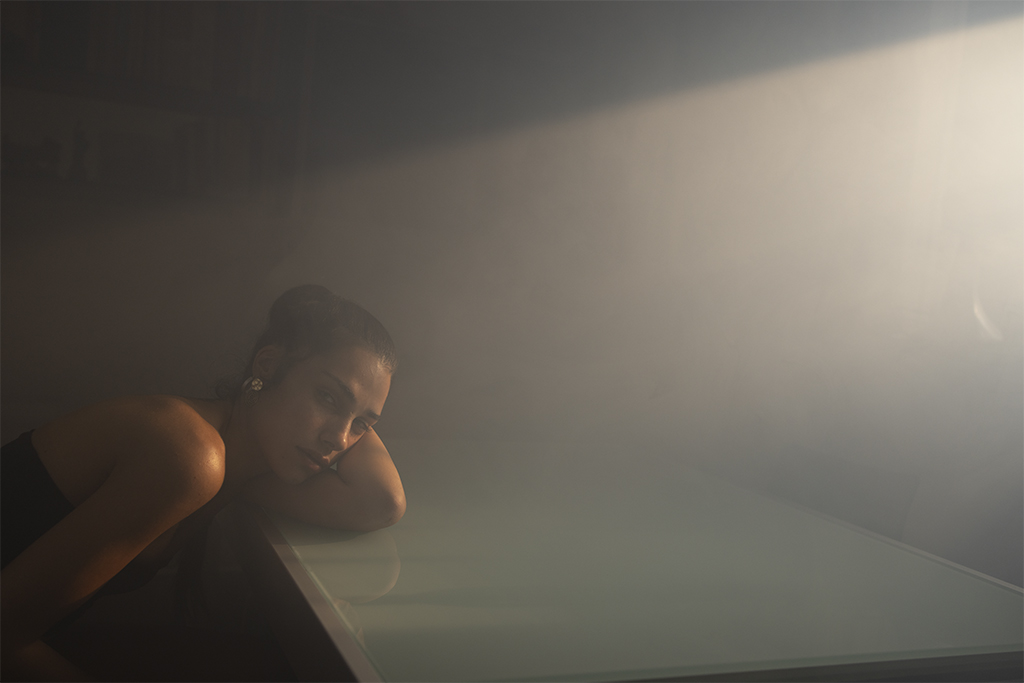
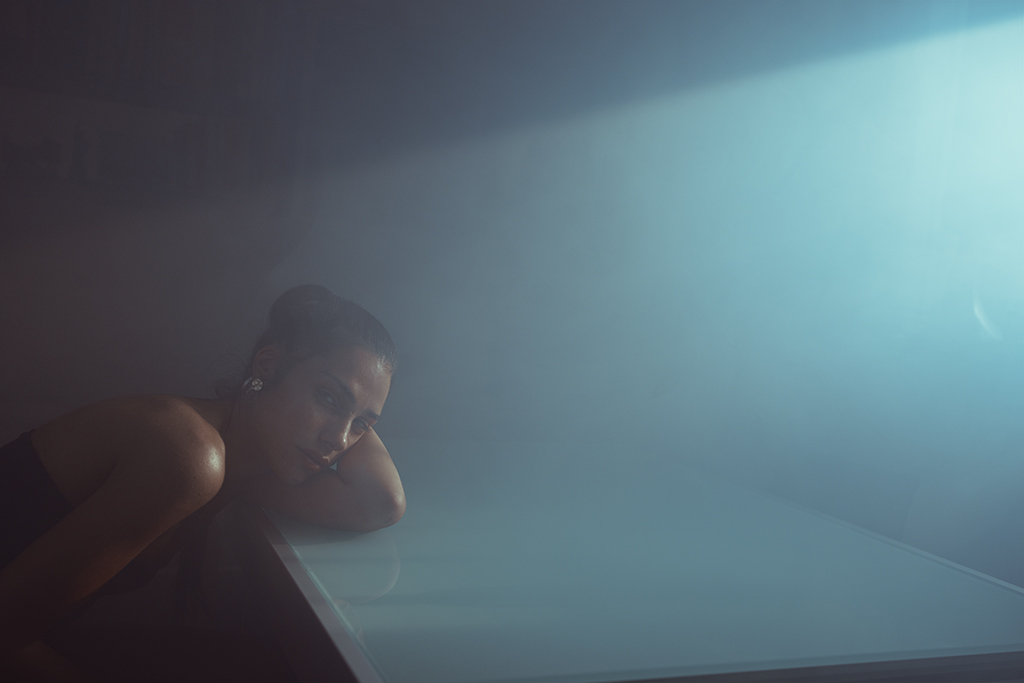
Photoshop remains at the center of the workflow. MindTheColor adds tools designed to analyze, separate and shape color through controls that are not natively available in Photoshop in the same way.
Chroma and saturation do not describe the same thing. A hue shift can produce different results depending on the color space in which it is calculated. Even the way a correction is distributed and interpolated between values affects the final result.
This is why MindTheColor does not force every operation into a single color space or a single representation of color. Depending on the tool, it works in HSP, HSL, HSV, CIELAB, CIELCh, OKLab, OKLCh, JzCzHz, CAM16-UCS and other domains selected according to the task. The document remains in Photoshop's standard RGB workflow: what changes is the domain in which the correction is calculated and the way you can control it.
MindTheColor does not impose a single way of working with color. It uses the domain best suited to the task and leaves the creative decision to you.
Four working areas
From the goal to the tool
Analyze the image, isolate what matters, correct the color and build the look. Four different areas, integrated into the same workflow.
01 - Analyze
Read the image beyond visual perception
Vectorscope, Waveform, Parade, LABscope and LCHscope reveal chromatic distribution, tonal structure and channel behavior. CIE 1931, Gamut 3D and LUT Viewer provide objective analysis of chromaticity, gamut volume and the transformations introduced by LUTs.
Your eye decides. Analysis tools help you understand what is happening in the image and why.
02 - Mask
Isolate what you want to correct
Build masks by combining multiple qualifiers, including qualifiers from different color domains. Add, subtract or intersect ranges of hue, saturation, chroma, brightness, lightness and RGB components. For skin, you can start from the automatic AI Skin selection, based on Photoshop's people detection.
Precise correction begins with a selection that actually follows the color and structure of the image.
03 - Correct
Correct color through its relationships
Primary correction works across the whole image, while secondary correction targets a specific color range. Dedicated curves and controls let you adjust hue, chroma, saturation, brightness and perceptual lightness, using the domain best suited to each tool. You can control not only the amount of correction, but also how it extends and transitions into neighboring values.
You are not simply changing a value. You are controlling how that correction relates to the rest of the image.
04 - Build the look
From correction to visual signature
Cinema Engine, Color Wheels, CurveG, Grid, SL Grid, B&W Mixer and Halation let you shape tone, palette, color separation and photochemical response. When the look is ready, LUT/XMP can export compatible adjustments as a .cube file or XMP preset, extending the workflow to Adobe Lightroom.
The result does not come from a fixed recipe. It comes from the choices you build into the image.
This video is hosted on YouTube. To play it here, YouTube needs your consent to its cookies.
A selection of tools
Ten ways to work with MindTheColor 3
Ten representative tools showing some of the panel's possibilities: color manipulation, masking, curves, analysis, photochemical emulation and optical effects. They are only part of a much broader working environment.
Click a tool to see it at work
01
Manipulate the image's color map directly
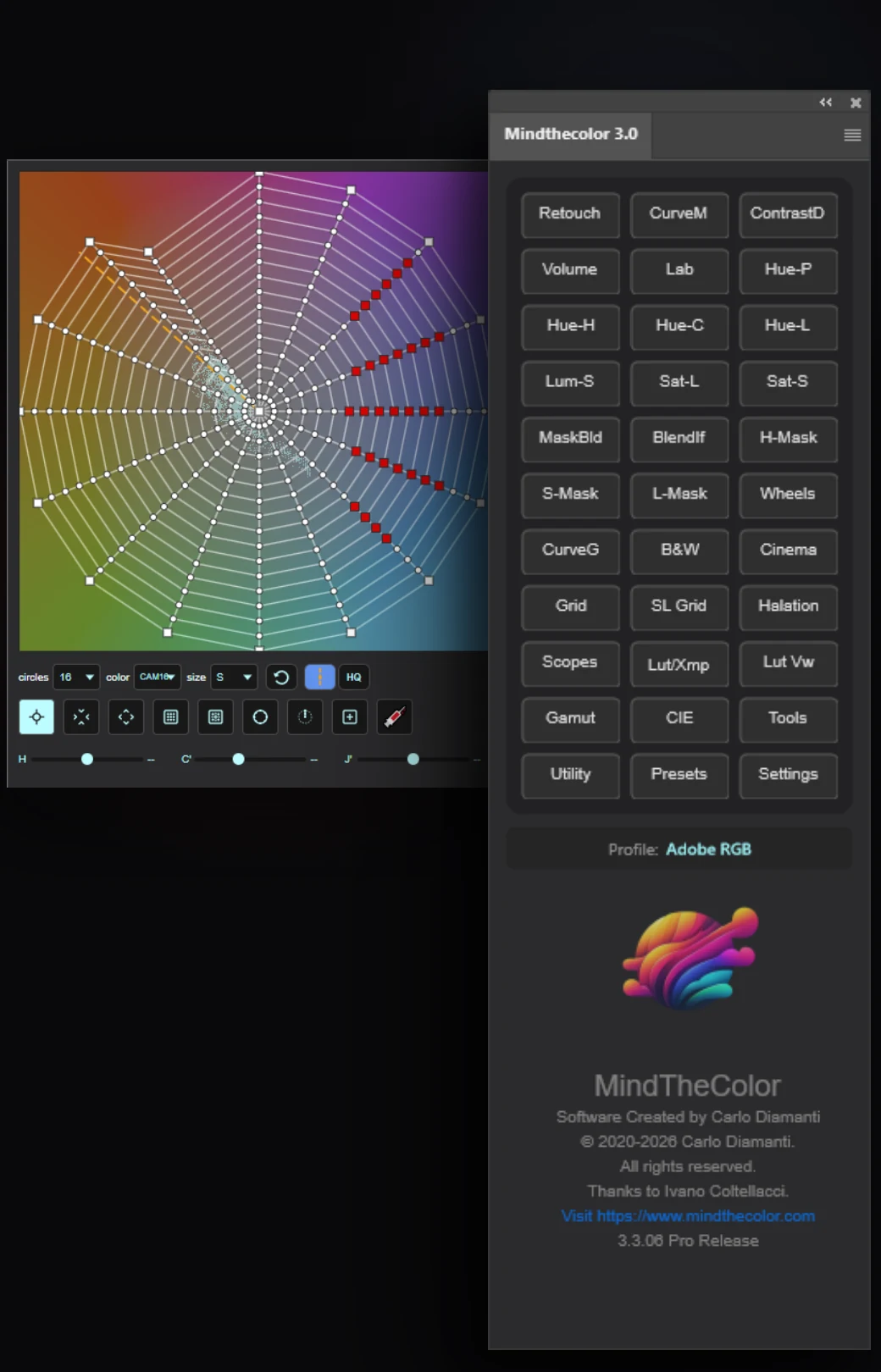
Grid is MindTheColor's central tool for direct color manipulation. Its polar grid represents color through movable vertices: the center corresponds to the neutral axis, chromatic intensity increases outward, and hue changes as you rotate around the center. Moving the vertices redefines the image's color mapping in real time.
Seven domains are available: HSP, HSL, HSB, CIELCh, OKLCh, JzCzHz and CAM16-UCS. The grid can use from 6 to 32 divisions. An integrated vectorscope overlays the image's chromatic distribution on the grid and, in the supported domains, adapts its representation to the selected domain.
New in MindTheColor 3. CIELCh, OKLCh, JzCzHz and CAM16-UCS join HSP, HSL and HSB. Also new are the integrated vectorscope, up to 32 divisions, multiple vertex selection, different canvas sizes and real-time updating.
02
Control color and tonal response within a single hue
SL Grid slices the color cylinder along an axis and displays it head-on. The complementary hue sits on the left, the neutral axis in the center, and the reference hue on the right. The vertical axis represents the tonal or luminous component of the selected domain, from black at the bottom to white at the top.
Every vertex is a control point. You can, for example, desaturate only the dark areas of a hue without affecting the midtones, or darken highly chromatic areas while leaving colors closer to neutral untouched. The adjustment extends progressively into neighboring hues, avoiding hard transitions. SL Grid also includes a vectorscope that adapts to the selected domain.
New tool in MindTheColor 3. SL Grid was introduced in version 3.
03
Three pairs of colors become an RGB curve
CurveM defines a color transformation through three pairs of colors, organized across highlights, midtones and shadows, and automatically translates them into a native Photoshop RGB Curves adjustment. For each pair, you choose the starting color and the color you want to obtain, and CurveM calculates the required transformation.
It can also be used for color matching: sample three colors from the image to be corrected and their corresponding targets from a reference image or a palette. Instead of manually building individual RGB channel curves, you work directly with Hue, Saturation and Brightness.
New in MindTheColor 3. The CurveM layer can update in real time while the sliders are adjusted.
04
Build the mask by combining multiple qualifiers
Mask Builder creates color masks by combining qualifiers from different color domains. You can, for example, select a hue in HSV, restrict the result to a lightness range in CIELCh or OKLCh, and then subtract a specific RGB component.
Six domains are available: HSV, HSL, HSP, RGB, CIELCh and OKLCh. Each qualifier can be added, subtracted or intersected with the existing mask. The Soft control adjusts the transition at the edges. The result can be loaded as an active selection or saved as an alpha channel.
New tool in MindTheColor 3. Mask Builder was introduced in version 3.
05
Build a photochemical response stage by stage
Cinema Engine is a film-emulation engine inspired by the photochemical chain of analog cinema. It does not simply apply a predefined look: it makes individually controllable stages inspired by negative processing, printer lights, split grading, tone mapping and print-film characterization.
The panel manages around seventy parameters, all updated in real time. Sections include Color Space, Negative Processing, Printer Lights, Split Grade, Selective Color, Tone Mapping, Print Stock and Perceptual Matrix Mixer. The result is written to a dedicated Color Lookup layer, and all parameters are stored in the layer metadata so the work can be reopened and continued later.
New tool in MindTheColor 3. Cinema Engine was introduced in version 3.
06
Parametric curves, native to Photoshop
CurveG builds native Photoshop curves through parameters inspired by film tonal response. Contrast, Toe, Shoulder, Latitude, Tilt, Black, White, Mid Push and Blend let you shape the entire contrast response parametrically and in real time, without manually repositioning curve points.
With RGB Curves enabled, the tonal curve becomes three separate Red, Green and Blue curves and incorporates the color biases defined in the Color Zones for highlights, midtones and shadows. The relationship is bidirectional: after building the color, you can return to contrast, toe, shoulder or latitude and the chromatic distribution adapts to the new tonal shape. Likewise, changing the Color Zones recalculates the RGB curves while preserving their relationship with the contrast.
New tool in MindTheColor 3. CurveG was introduced in version 3.
07
A lightness curve for every color zone
B&W Mixer converts the image to black and white using curves rather than simple sliders. Each of the seven color zones R, O, Y, G, C, B and M has its own complete lightness curve. A Neutral zone handles low-chroma colors, while a Global curve acts as the final master control.
The tool works in OKLCh, analyzing lightness, chroma and hue. The Range control, from ±10° to ±60°, determines how far each zone extends into neighboring hues. With B&W disabled, the same curves can adjust lightness while preserving color. The Toning module can also apply uniform coloring or split toning.
New tool in MindTheColor 3. B&W Mixer was introduced in version 3 and is built on the OKLCh domain.
08
Six tools for reading the image in real time
Scopes is MindTheColor's color-analysis system. It includes Vectorscope, Waveform RGB, Parade, WaveformL, LCHscope and LABscope. The Vectorscope can operate in HSV or Y′CbCr, while WaveformL reads CIELAB L* lightness directly, adding perceptual-domain analysis alongside traditional RGB views.
The six tools can be arranged in Single, Dual H, Dual V and Wall layouts. In multi-scope layouts, each cell has its own Live control, so one reading can be frozen while the others continue updating. In Single view, the Vectorscope can also display the image's percentage distribution across eight color categories.
New in MindTheColor 3. Four layouts, independent Live controls, persistent settings, skin tone lines in LCHscope and LABscope, and the Vectorscope Color % panel. The Vectorscope Skin Line also includes a Profile mode that automatically adapts the skin reference to the document's color profile.
09
See the gamut and image colors in 3D space
Gamut 3D is a three-dimensional color-analysis tool. It displays the chromatic volume of the document profile in CIELAB and compares it with an ICC or ICM profile installed on the system. Image pixels can be projected into the same space as colored points, showing where they sit in relation to the limits of the profiles.
It is designed for photography, prepress, printing and color control. The comparison helps reveal how much of the available gamut the image actually uses and which areas may become critical when moving to a smaller destination gamut. When profile data is available, Gamut 3D builds the volume from the actual installed profile rather than using a generic shape.
New tool in MindTheColor 3. Gamut 3D introduces real ICC and ICM profile reading, volume comparison, pixel scatter, Live updating and dedicated handling for compatible RGB, CMYK and Gray profiles.
10
Control halation and glow separately
Halation simulates two different phenomena. Halation recalls the halo that can form in film when intense light passes through the emulsion, reflects near the film base and re-enters the sensitive layers. In color film this halo is often warm. Glow, or optical bloom, instead comes from light diffusion and internal reflections in the optical system, producing a softer and generally more neutral veil.
The two sections provide dedicated controls for color, intensity and diffusion. Halation is generated around highlights rather than directly covering their center, which remains clean, while shadows are protected during the blend.
New tool in MindTheColor 3. Halation was introduced in version 3 as a standalone tool.
Everything that changes in MindTheColor 3
14 new tools, all the others extensively renewed
MindTheColor 3 does more than add new features. Alongside fourteen new tools, the existing modules have been extensively updated with new color domains, numeric controls, resizable windows, real-time updates and more advanced color-profile handling.
The fourteen new tools
Cinema Engine
A photochemical pipeline divided into independent stages, with around seventy controllable parameters.
SL Grid
Controls chromatic intensity and tonal response within a single hue, while keeping the neutral axis and complementary hue visible.
CurveG
Native Photoshop parametric curves with a bidirectional relationship between tonal shape and Color Zones.
B&W Mixer
Black-and-white conversion through a lightness curve for each color zone, working in OKLCh.
Halation
Film halation and optical glow handled through two independent pipelines.
Mask Builder
Builds masks by combining qualifiers from six different color domains.
Blend If
Controls blending from the composite or individual RGB channels without opening Photoshop's Layer Style window.
Hue-P
A perceived-brightness curve applied selectively to a chosen family of hues.
Sat-Lum
Lightens or darkens the image according to HSP saturation or CIELCh chroma, depending on the selected domain.
Sat-Sat
Adjusts HSP saturation according to its starting value, separating low, medium and high saturation ranges.
Gamut 3D
Displays the profile volume in CIELAB and projects the image pixels into the same three-dimensional space.
CIE 1931
Displays image chromaticity on the xy diagram and compares it with the profile gamut.
Lut Viewer
Analyzes a .cube LUT through neutral-axis curves and a three-dimensional view of the transformation.
Lut / Xmp
Exports the look as a .cube LUT or an XMP profile compatible with Adobe Camera Raw and Lightroom, and converts XMP back to .cube.
And all the others
The tools you already know have not stayed the same
New color domains, redesigned curves, numeric controls, resizable windows and real-time updates have reshaped much of the panel, not only the new tools.
- Hue-Chroma replaces Hue-Sat and offers six selectable domains: HSP, HSV, HSL, CIELCh, OKLCh and JzCzHz. Adv mode meters chromatic increases according to both the tonal region and the starting chromatic component, supporting less intense colors more strongly while keeping already intense colors under greater control.
- Grid adds CIELCh, OKLCh, JzCzHz and CAM16-UCS alongside HSP, HSL and HSB. It integrates the vectorscope directly into the grid, supports up to 32 divisions and lets you control the selected vertex through hue, chromatic intensity and the tonal component of the chosen domain. XS-L canvases, multiple vertex selection and real-time updating are also available.
- Lum-Sat introduces the HSP/LCh selector and adapts its calculations to the document color profile.
- Color Wheels offers two working modes: Color with Lift, Gamma and Gain, and Log with Shadow, Midtone and Highlight. Wheels and Bars views are available, together with the new Intensity, Slow and Roll-off controls.
- Scopes brings together six instruments: Vectorscope, Waveform RGB, Parade, WaveformL, LCHscope and LABscope. Four layouts are available, Single, Dual H, Dual V and Wall, with independent Live controls and, in Single view, the percentage distribution of pixels across eight color categories.
- Skin tone line: the Vectorscope Profile mode adapts the skin-tone reference to the document color profile. LCHscope and LABscope also include a skin tone line and update their references according to the active profile.
- False Color divides CIELAB L* lightness into sixteen 6.25-unit bands and assigns a reference color to each one. The calculation adapts to the document color profile.
- Export remembers the destination folder and can save PSD and PSB, full-resolution JPEG and TIFF files, or Social JPEG and TIFF files at 2048 px on the long side in sRGB.
- AI Skin automatically selects face and body skin through Photoshop's people detection.
- Tools brings mask, selection, alpha-channel and utility commands together in a standalone panel that is always accessible.
- Interface: main-panel buttons can be reordered by dragging and customized with background and text colors. The choices are stored between sessions.
- Curve editors: across the main curve-based tools, single-click point creation, numeric In and Out fields, resizable canvases, the HQ button and real-time updating have been standardized.
An outside perspective
Marco Olivotto on MindTheColor 3
Nine minutes to discover MindTheColor 3 through the perspective of someone who studied it in depth and created the tutorials around it. This is not a technical presentation, but a reflection on the way MindTheColor 3 approaches color, the level of control it provides, and the role it can play within a photographic workflow.
This video is hosted on YouTube. To play it here, YouTube needs your consent to its cookies.
Introduction video, 9 minutes.
In the video, Marco explains why MindTheColor 3 favors conscious control over automation, what it means to work with perceptual color models that are not natively available in Adobe Photoshop, and what new possibilities can emerge from a deeper approach to color management and image development.
Anyone who tells you there is a button for the perfect image is lying to you. Marco Olivotto
Who Marco Olivotto is
- Works with digital color, mainly in photography
- Teaches on four academic-level courses, including photographic post-production
- Author of books and video courses dedicated to color
- EIZO Ambassador for eleven years
- Created the tutorials for the previous version and for MindTheColor 3
Before you buy
Get to know it before you decide
The tutorials and manual are free, even if you never buy MindTheColor.
See MindTheColor at work
The 37 tutorials show the tools working on real images. You can see how the different modules behave, understand the workflow and judge directly whether MindTheColor fits the way you work.
No sign-up required.
190
pages of manual
English and Italian
The manual documents the interface controls, the operating principle of each tool, the color domains it uses and the logic behind the different functions. The introductory chapters also cover perception, color harmony, color spaces and the relationship between visual intent and automation.
PDF, opens in a new tab.
Download the manual, watch the tutorials and decide at your own pace whether MindTheColor fits the way you work.
From the people who use it
What MindTheColor users say
Photographers, retouchers and colorists share their experience and how MindTheColor fits into the way they work.
It is an absolutely innovative panel that provides photographers with a range of professional tools never seen before in any editing panel. It allows you to approach work methodically and scientifically, giving you the opportunity to work with unique tools that simplify and streamline the workflow. You have every tool you could wish for at your disposal, and the most astonishing thing is the precision with which they work. Absolutely a must-have if you want to make a quality leap. Highly recommended.
Alessio Eleuteri
Fantastic set of tools, they are a must for anyone serious about postproduction.
Davide Barranca
MindTheColor 3 feels like a creative instrument built on an extraordinary concentration of technology. It gives you deep control over color without getting in the way of intuition, allowing technical precision to become part of the artistic process.
Dayana Montesano
Licences and upgrades
Choose the option that fits you
MindTheColor 3
Full licence for anyone who does not own a previous version.
Until [END DATE]. Then 179 € + VAT.
Free updates throughout the 3.x series.
- 14 new tools and all existing modules extensively renewed
- Free updates throughout the entire 3.x series
- No seat limit when using the same Adobe Creative Cloud account
- Complete manual and 31 video tutorials
- Direct support
Requires Adobe Photoshop 26 or later on macOS or Windows, with Creative Cloud Desktop installed and up to date.
Already have MindTheColor?
Two upgrade options, depending on the version you own.
Until [END DATE]. Then 79 € and 99 € + VAT.
- Includes everything provided with the full licence
Complete bundle
Density, MindTheColor 3 and ChromaWarp together.
[PROMO NAME] until [END DATE]. Then 249 € + VAT.
- Density 69 €
- MindTheColor 3 179 €
- ChromaWarp 89 €
- Bought separately 337 €
Frequently asked questions
Answers to the most common questions
What is MindTheColor 3?
MindTheColor 3 is a professional Adobe Photoshop plugin for color correction, color grading, retouching, mask building, image analysis and look development. It works directly within Photoshop's normal layer system and, depending on the tool, uses different color domains while always returning the result to the RGB document.
What are the requirements?
Adobe Photoshop 26 or later on macOS or Windows, with Adobe Creative Cloud Desktop installed and up to date. Your computer must meet the official requirements of the Photoshop version you are using. An Internet connection is required for installation, authentication and licence verification.
Does it work on Apple Silicon Macs?
Yes. MindTheColor 3 is a UXP plugin, not a legacy CEP panel, and is compatible with Apple Silicon Macs that meet the requirements of the Photoshop version being used.
Is there a trial version?
No. Due to the nature of the tools and their level of integration within Photoshop, a trial version is not available. The complete manual and all 31 video tutorials are available for free, allowing you to see in detail how the software works before purchasing.
How can I learn to use it?
The complete 190-page manual, available in English and Italian, and the 31 video tutorials, totaling around five hours, are freely accessible even before purchase. You can explore the tools and workflow before deciding.
What do I receive after purchase?
You receive an email containing the software download link and your licence serial. MindTheColor is supplied as a .ccx file and installs through Adobe Creative Cloud Desktop.
We recommend keeping the purchase email, as it contains access to both the software and your serial.
Can I request a refund?
No. MindTheColor is a digital product and, once the purchase has been completed, the licence is non-refundable.
I already own MindTheColor. How much is the upgrade?
The upgrade price depends on the version you own:
- From MindTheColor 2 79 € + VAT [UPGRADE PRICE MTC2] € + VAT
- From MindTheColor 1 99 € + VAT [UPGRADE PRICE MTC1] € + VAT
Write to us from the email address used for your previous purchase and we will send you the upgrade link, with the price corresponding to the licence you own:
The upgrade link is sent to the email address used for your previous purchase, with the price corresponding to the licence you own.
The offer is available until [END DATE]. If you have not received the email, contact us and we will send it again:
mindthecolor2021@gmail.comHow many computers can I use it on?
The licence does not limit the number of workstations, provided they all use the licence holder's same Adobe Creative Cloud account. If you change computer while keeping the same Adobe account, no additional procedure is required.
Can I change my Adobe account?
Yes. On first use, the serial is linked to the active Adobe Creative Cloud account. If you need to change account, you can request that the binding be released free of charge. The request is normally handled within 24 working hours.
support@mtclicense.comDo I need to stay connected to the Internet?
No. A connection is required when the plugin starts for a verification that normally takes only a few seconds. Once the check is complete, MindTheColor can continue working offline for the rest of the Photoshop session.
A connection will be required again the next time the plugin or Photoshop is started.
What is the update policy?
All updates within the MindTheColor 3.x series are free. A future move to a new major release, such as MindTheColor 4, may be offered as a paid upgrade with dedicated terms for existing customers.
Are there dedicated terms for schools and academies?
Yes. A 30% discount is available for purchases of 5 licences or more. Contact us before purchasing to receive the dedicated terms.
mindthecolor2021@gmail.com