MTC ChromaWarp · Photoshop plugin
MTC ChromaWarp: a new paradigm for color manipulation
Colorimetric precision, advanced interpolation, and multi-dimensional control for the demanding professional.
If you work with color at a professional level, you know the intrinsic limits of standard tools. You’ve tried to isolate a cast in a skin tone only to watch it bleed into adjacent colors. You’ve attempted to change the color of an object and ended up with artifacts and unnatural halos. This isn’t your fault,it’s a fundamental limitation of the technology you’re using.
Photoshop’s Hue/Saturation tool, for example, relies on a one-dimensional selection model. Although it lets you adjust hue, saturation, and brightness, its targeting mechanism is based almost exclusively on a hue range. This approach is scientifically inadequate for separating colors that share a similar hue but differ significantly in chroma or brightness—like a highly saturated orange dress versus a skin tone. The result is inevitable color contamination and wasted time on complex manual masking.
It’s time to move beyond these compromises.
MTC ChromaWarp: Color Engineering at Your Service
MTC ChromaWarp is not just another plugin,it’s a complete color-transformation engine. It was engineered from the ground up to solve the fundamental challenges of digital color grading, built on three scientific pillars that deliver a level of quality and control conventional tools cannot match.
The Core of the System: The CIELAB Color Space
Unlike tools that operate in RGB, MTC ChromaWarp performs all computations internally in the CIELAB color space. Because CIELAB is perceptually uniform, numerical distances between colors in Lab correspond closely to differences perceived by the human eye. This translates to:
- Natural Transformations: Even extreme color variations appear organic and free of artifacts.
- Superior Quality: The structure of Lab enables radical color shifts while preserving the image’s integrity and tonal richness.
The Advanced Interpolation Algorithm
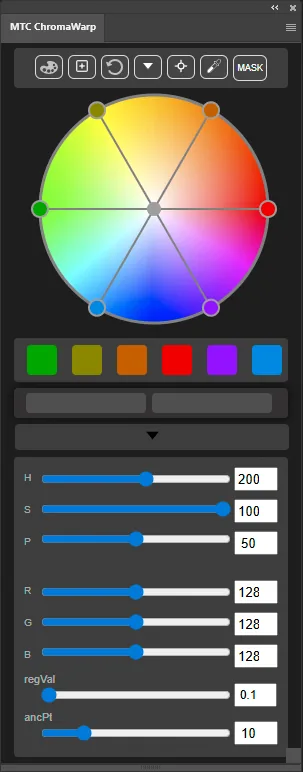
Here lies the real power. MTC ChromaWarp doesn’t merely “nudge” a color; it computes a smooth, global deformation of the entire 3D color space. It uses a sophisticated multi-dimensional interpolation algorithm to solve a complex mathematical system. Think of defining up to six input colors and six output colors—no other tool can calculate such a precise, simultaneous correspondence. The algorithm constructs an ideal transformation surface,like a flexible metal sheet,that passes exactly through the points you define, ensuring every intermediate color is remapped with perfect mathematical consistency
The Perceptual Model: HSP (Hue, Saturation, Perceived Brightness)
Even the interface is scientifically informed. For brightness control, MTC ChromaWarp uses the HSP model rather than HSL or HSB. Its “P” parameter is not a trivial mathematical brightness, but Perceived Brightness—a value that aligns far more closely with the human visual system. Adjustments become more intuitive, predictable, and natural.
Unprecedented Control in a Smarter Workflow
This powerful technology is made accessible through an interface and workflow designed for maximum precision and efficiency:
- Real-Time Engine: Experience a fluid, interactive workflow. Every adjustment you make instantly updates the final LUT in real-time, giving you immediate visual feedback on your image. There is no lag or need to wait for rendering—just a seamless connection between your creative decisions and the result.
- A Truly Non-Destructive Process: Your work is always safe and re-editable. MTC ChromaWarp applies its transformations via a Color Lookup adjustment layer. Crucially, all your settings—every ray position, anchor point, and HSV qualifier value—are saved as XMP metadata directly into that layer. You can save your document, close it, and upon re-selecting the layer, the plugin's interface will instantly restore to the exact state you left it in, ready for further refinement.
- Anchor Points ("Paletti"): These are not simple "locks" but boundary conditions for the interpolation algorithm. Think of them as magnets placed on the imaginary metal sheet of the color space: each "paletto" imposes a point of stability that the algorithm must respect, preventing that color from shifting . This allows you to protect critical colors (like skin tones) with surgical precision while transforming everything else.
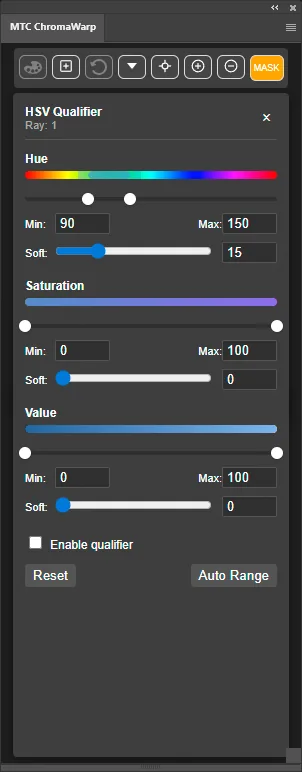
- HSV Qualifier: This takes selectivity to the next level. For each transformation, you can define the domain of application based not only on hue but also on specific ranges of saturation and brightness. This allows you to apply an effect only to the most saturated blues, or only to the darkest oranges, offering a level of control that previously required hours of manual masking
Built for the Professional
MTC ChromaWarp is designed for those who refuse compromises. It is a precision instrument for photographers, retouchers, and colorists who understand color science and demand absolute control to realize their artistic vision. If you seek superior results and a smarter, more efficient workflow, you’ve found the definitive tool.
Purchase MTC ChromaWarp and experience a new level of color engineering.
Licences
ChromaWarp on its own or in the complete bundle
MTC ChromaWarp
The complete plugin for anyone who wants to purchase this tool individually.
Personal licence linked to your Adobe Creative Cloud account.
- Color transformations calculated internally in CIELAB
- Multidimensional interpolation with up to six input and six output colors
- HSV Qualifier and Anchor Points for precise control over the affected region
- Real-time updating and a non-destructive workflow through a Color Lookup layer
- Tool settings stored in the layer metadata
- Free updates throughout the 1.x series
- No workstation limit when using the same Adobe Creative Cloud account
- Manual available in English and Italian
Requires Adobe Photoshop 26 or later on macOS or Windows, with Creative Cloud Desktop installed and up to date. An Internet connection is required for authentication and licence verification.
Complete bundle
Density, MindTheColor 3 and ChromaWarp together.
Special price until [END DATE]. Then €249 + VAT.
Save €88 compared with the individual list prices.
Save €[PROMO SAVING] compared with the individual list prices.
- MTC Density €69
- MindTheColor 3 €179
- MTC ChromaWarp €89
- Bought separately €337
Video tutorials
ChromaWarp in action
This video is hosted on YouTube. To play it here, YouTube needs your consent to its cookies.
This video is hosted on YouTube. To play it here, YouTube needs your consent to its cookies.
This video is hosted on YouTube. To play it here, YouTube needs your consent to its cookies.
This video is hosted on YouTube. To play it here, YouTube needs your consent to its cookies.
This video is hosted on YouTube. To play it here, YouTube needs your consent to its cookies.
This video is hosted on YouTube. To play it here, YouTube needs your consent to its cookies.
This video is hosted on YouTube. To play it here, YouTube needs your consent to its cookies.
This video is hosted on YouTube. To play it here, YouTube needs your consent to its cookies.
This video is hosted on YouTube. To play it here, YouTube needs your consent to its cookies.
This video is hosted on YouTube. To play it here, YouTube needs your consent to its cookies.
This video is hosted on YouTube. To play it here, YouTube needs your consent to its cookies.
This video is hosted on YouTube. To play it here, YouTube needs your consent to its cookies.
This video is hosted on YouTube. To play it here, YouTube needs your consent to its cookies.
Frequently asked questions
FAQ - MTC ChromaWarp
Answers to the most common questions about ChromaWarp installation, licensing, compatibility and use.
What is MTC ChromaWarp?
MTC ChromaWarp is an Adobe Photoshop plugin for advanced color transformation. It performs its calculations internally in CIELAB and uses multidimensional interpolation to remap color smoothly and precisely.
Is it suitable for beginners?
Yes. ChromaWarp provides the precision required for professional work while keeping its interface direct. You can begin by dragging the points and seeing the result in real time. To take full advantage of advanced features such as HSV Qualifier and Anchor Points, we recommend the tutorials and manual.
What are the requirements?
Adobe Photoshop 26 or later on macOS or Windows, with Adobe Creative Cloud Desktop installed and up to date. The computer must meet the requirements of the Photoshop version being used.
Does it work on Apple Silicon Macs?
Yes. MTC ChromaWarp is a UXP plugin and is compatible with Apple Silicon Macs that meet the requirements of the Photoshop version being used.
Is there a trial version?
No. A trial version is not available. You can consult the product page, tutorials and manual to understand how ChromaWarp works before purchasing.
What do I receive after purchase?
You receive an email containing the software download link and your licence serial. MTC ChromaWarp is supplied as a .ccx file and installs through Adobe Creative Cloud Desktop. Once installed, it is available from Photoshop's Plugin menu.
Can I request a refund?
No. MTC ChromaWarp is a digital product and, once the purchase has been completed, the licence is non-refundable.
How many computers can I use it on?
The licence does not limit the number of workstations, provided they all use the licence holder's same Adobe Creative Cloud account. Changing computer while keeping the same Adobe account does not require a new licence.
Can I change my Adobe account?
If you need to replace your Adobe Creative Cloud account, contact licence support before proceeding. The licence remains personal and cannot be transferred to another user.
support@mtclicense.comIs an Internet connection required?
Yes. An Internet connection is required for authentication and licence verification. If the online verification cannot be completed, the plugin cannot be activated.
What is the update policy?
All updates within the MTC ChromaWarp 1.x series are free. A future move to a new major release, such as ChromaWarp 2, may be offered as a paid upgrade.
Is a user manual available?
Yes. The manual is available in both English and Italian from the same download area as MTC ChromaWarp.
Are there dedicated terms for schools and academies?
Yes. A 30% discount is available for purchases of 5 licences or more. Contact us before purchasing to receive the dedicated terms.
mindthecolor2021@gmail.com